

How to File ITR Online in India 2026 — Complete Step-by-Step Guide with Screenshots
Table of Contents
Welcome to the definitive, technical guide on filing your Income Tax Return (ITR) in India for the Assessment Year (AY) 2026-27, which corresponds to the Financial Year (FY) 2025-26.
Filing your taxes can often feel like an intricate maze of legal jargon and changing regulations. However, the Income Tax Department’s robust e-Filing 2.0 portal has transformed this compliance mandate into a highly digitized, data-driven process. Whether you are a salaried employee, a specialized freelancer, or a seasoned investor managing capital gains, accurate and timely tax filing is a critical component of your financial integrity.
This year brings significant updates. The New Tax Regime under Section 115BAC continues as the default taxation structure, featuring revised tax brackets, a substantial standard deduction of ₹75,000 for salaried taxpayers, and a rebate umbrella that effectively shields income up to ₹12 lakh from taxation.
This post serves as a comprehensive, step-by-step block structured guide designed to help you navigate the e-Filing portal seamlessly.
Important Dates for ITR Filing (AY 2026-27)
To avoid penal interest under Section 234A, 234B, and 234C, and late filing fees under Section 234F, adhere to the following statutory deadlines:
- Financial Year (FY): April 1, 2025 – March 31, 2026
- Assessment Year (AY): 2026-27
- Original Return Due Date (Non-Audit Cases): July 31, 2026
- Belated/Revised Return Due Date: December 31, 2026
Note: Missing the July 31 deadline invokes a late fee of up to ₹5,000 and restricts your ability to carry forward certain financial losses.
Crucial Documents Required for Online Filing
Before initiating an active session on the e-Filing portal, consolidate your financial documentation. The portal relies heavily on pre-filled data, which must be cross-verified against your personal records.
- Form 16 (Part A & B): Issued by your employer, detailing your gross salary, claimed exemptions (if opting for the old regime), and Tax Deducted at Source (TDS).
- Form 26AS: The consolidated annual tax statement showing all TDS, Tax Collected at Source (TCS), and advance taxes paid against your Permanent Account Number (PAN).
- Annual Information Statement (AIS) & Taxpayer Information Summary (TIS): The most critical documents introduced in recent years. The AIS captures an exhaustive ledger of your financial transactions, including savings interest, mutual fund purchases, stock market trades, foreign remittances, and high-value transactions.
- Capital Gains Statements: Downloaded from your stockbroker or mutual fund registrar (CAMS/KFintech) if you sold equities or mutual funds.
- Home Loan Interest Certificate: To claim deductions under Section 24(b) if you are opting for the Old Tax Regime.
- Bank Statements: To compute exact interest earned from savings and fixed deposit accounts.
Deciphering the ITR Forms: Which One is for You?
Selecting the correct structural form is imperative. Filing the wrong ITR renders the return “defective” under Section 139(9).
- ITR-1 (Sahaj): For resident individuals with a total income up to ₹50 Lakhs. Income sources must be limited to Salary/Pension, one House Property, and Other Sources (interest, family pension). Not applicable if you have capital gains, foreign assets, or are a company director.
- ITR-2: For individuals and Hindu Undivided Families (HUFs) not having income from profits and gains of business or profession. Use this if you have Capital Gains (stocks, property, crypto), hold foreign assets, or have income from more than one house property.
- ITR-3: For individuals and HUFs having income from profits and gains of a Business or Profession. This is heavily utilized by full-time day traders and independent contractors.
- ITR-4 (Sugam): For individuals, HUFs, and Firms (other than LLP) with total income up to ₹50 Lakhs having business or professional income computed under “presumptive taxation” schemes (Sections 44AD, 44ADA, or 44AE).
The Default New Tax Regime vs. The Old Tax Regime
For AY 2026-27, the New Tax Regime is the default selection. If you wish to claim traditional deductions (like Section 80C, 80D, or HRA), you must explicitly opt out of the new regime by submitting Form 10-IEA (for business income) or selecting the option directly in the ITR form (for salaried individuals).
New Tax Regime Slabs (FY 2025-26 / AY 2026-27):
- Up to ₹4,00,000: Nil
- ₹4,00,001 to ₹8,00,000: 5%
- ₹8,00,001 to ₹12,00,000: 10%
- ₹12,00,001 to ₹16,00,000: 15%
- ₹16,00,001 to ₹20,00,000: 20%
- ₹20,00,001 to ₹24,00,000: 25%
- Above ₹24,00,000: 30%
Technical Highlight: Under Section 87A of the New Regime, if your taxable income after the ₹75,000 standard deduction does not exceed ₹12,00,000, your tax liability is reduced to absolutely zero via a rebate of up to ₹60,000.
Pre-Requisites Before Hitting “Start”
- Link PAN and Aadhaar: Failure to link renders your PAN inoperative, halting the ITR process and preventing tax refunds.
- Pre-Validate Your Bank Account: The Income Tax Department only issues electronic refunds to pre-validated bank accounts linked with your PAN. Navigate to My Profile > My Bank Accounts on the portal to verify the status.
- Analyze Your AIS: Log in to the portal, go to the ‘Services’ tab, and open the ‘Annual Information Statement (AIS)’. Ensure every transaction listed belongs to you. Discrepancies here directly lead to automated tax notices under Section 143(1).
Step-by-Step Guide to File ITR Online in India 2026
Follow this precise workflow to successfully transmit your return to the Centralized Processing Center (CPC).
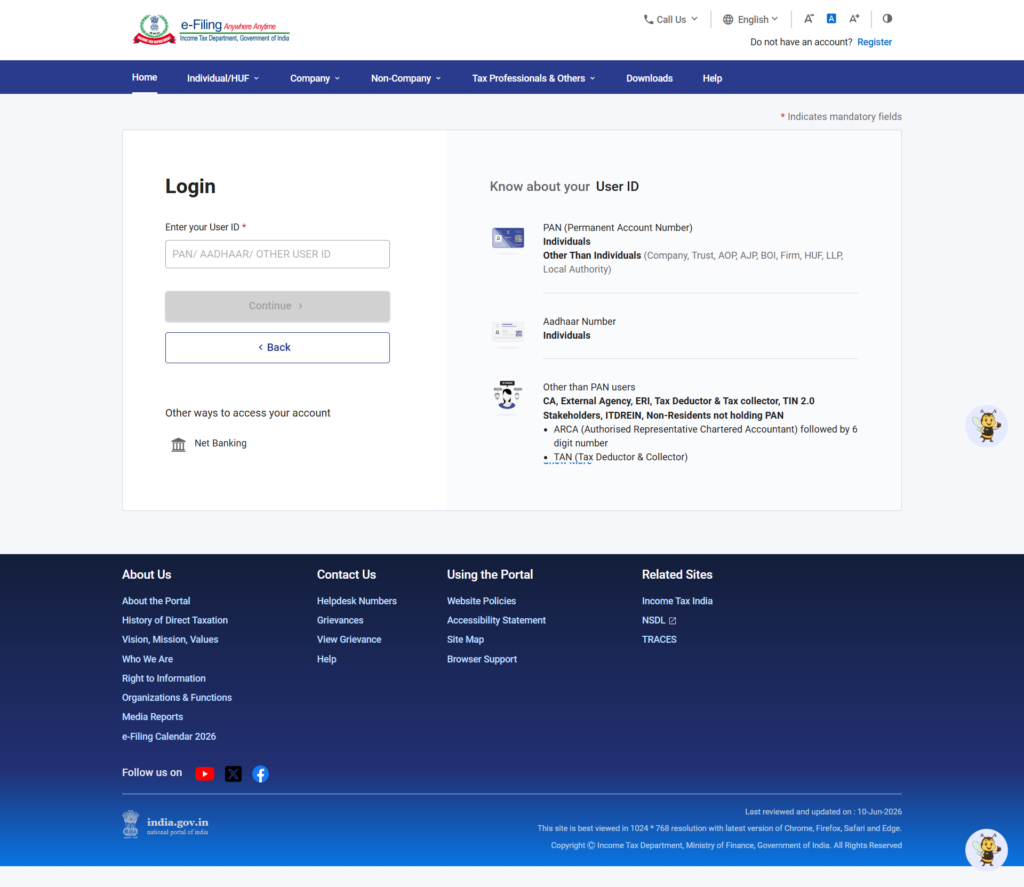
Step 1: Login to the e-Filing Portal
Visit the official portal: https://www.incometax.gov.in/iec/foportal/
Click on the Login button at the top right. Enter your PAN as your User ID. Verify the secure access message, input your password, and click Continue.
Step 2: Navigate to File Income Tax Return
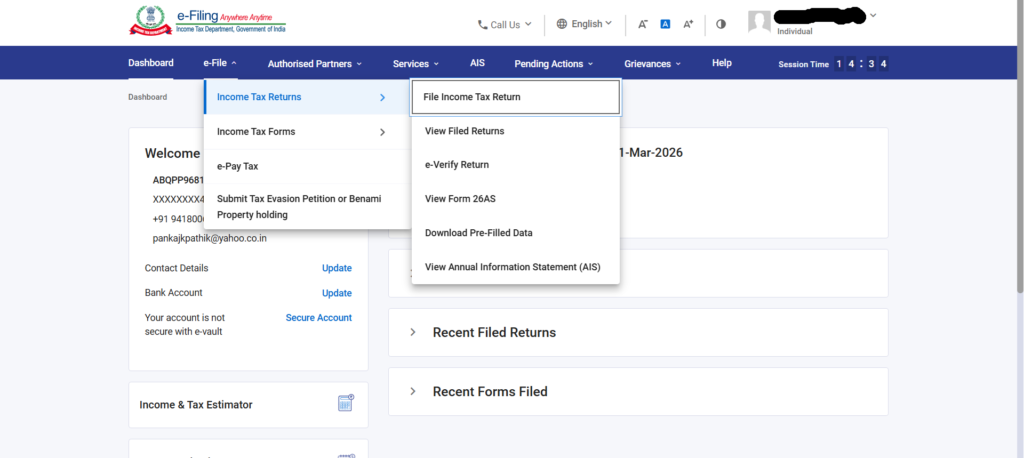
Once on your personalized dashboard, locate the top navigation menu.
Go to e-File > Income Tax Returns > File Income Tax Return.
Step 3: Select Assessment Year and Filing Mode
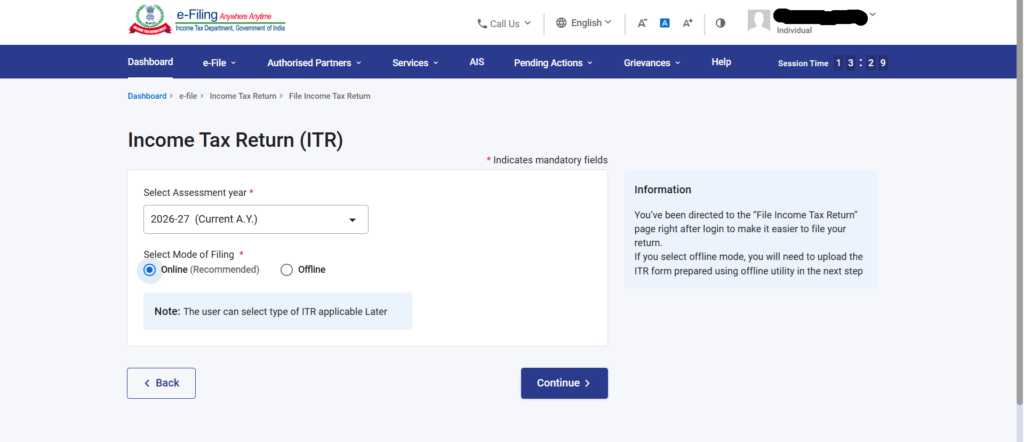
- Assessment Year: Select 2026-27 from the dropdown menu.
- Mode of Filing: Choose Online (Recommended). The offline mode requires downloading a JSON utility, which is generally only necessary for highly complex corporate or audit cases.Click Continue, then click Start New Filing.
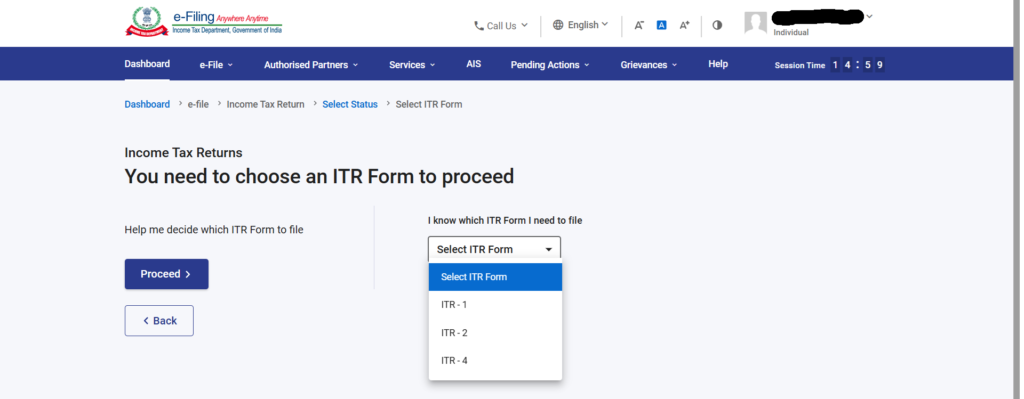
Step 4: Define Status and ITR Form Type
- Select your status as Individual, HUF, or Others. Select Individual.
- Next, you will be prompted to choose your ITR Form. Based on the criteria discussed earlier, select the appropriate form (e.g., ITR-1 or ITR-2).
- The portal will display the list of documents you need. Click Let’s Get Started.
Step 5: Answer the Applicability Questionnaire
The system will ask why you are filing the return. The most common technical selection is: “Taxable income is more than basic exemption limit.” Alternatively, you might be filing due to specific seventh proviso to Section 139(1) conditions (e.g., depositing >₹1 crore in a current account, spending >₹2 lakh on foreign travel, or paying >₹1 lakh in electricity bills). Select accordingly and proceed.
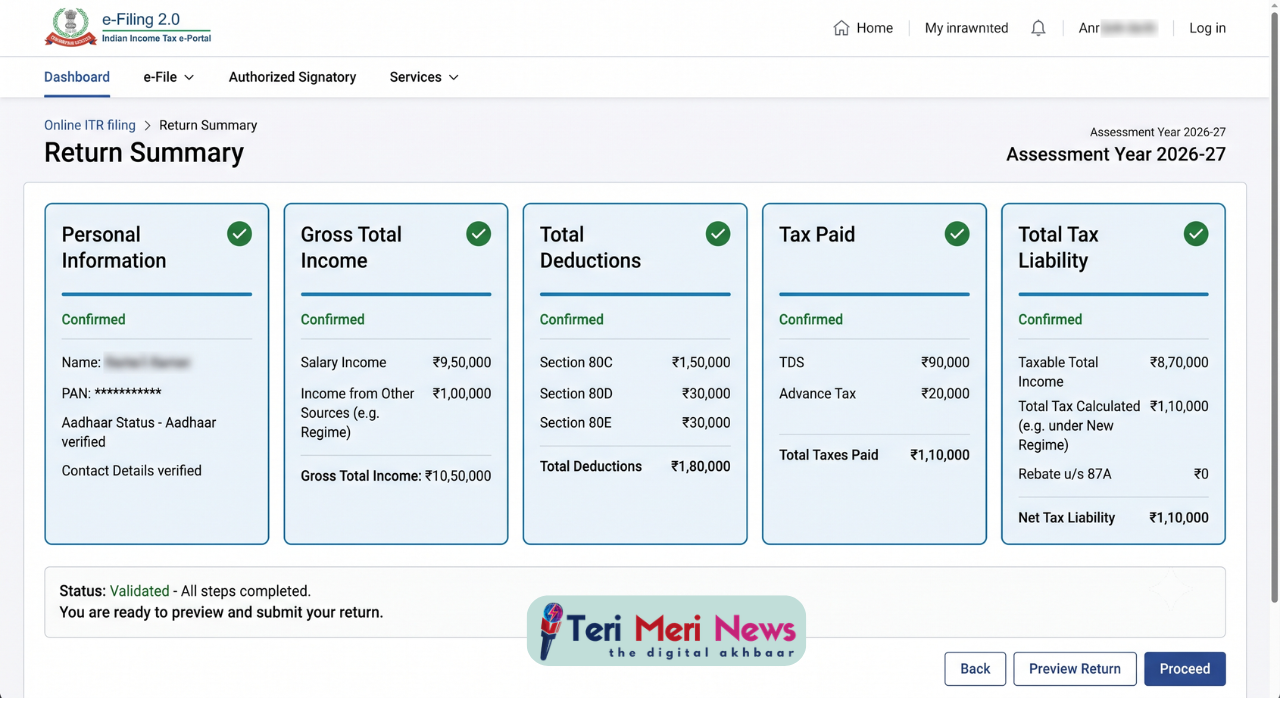
Step 6: Validate Pre-Filled Data (The Core Schedules)
The portal will present your return broken down into distinct schedules (blocks). You must validate each schedule individually.
- Personal Information: Verify your Aadhaar details, contact information, and ensure your pre-validated bank account is selected for the refund.
- Gross Total Income: This data is fetched directly from your Form 16 and AIS.
- Salary Exemption: If opting for the old regime, input your HRA (Sec 10(13A)) and LTA. If using the new regime, the ₹75,000 standard deduction will be auto-calculated.
- Income from Other Sources: Declare your savings bank interest, FD interest, and dividends. Do not skip this; the department cross-matches this with your AIS.
- Total Deductions: If you selected the Old Tax Regime, this schedule allows you to input Chapter VI-A deductions (Section 80C, 80D medical insurance, 80TTA/TTB interest deductions).
- Tax Paid: Verify your TDS, TCS, and Advance Tax. The values here must perfectly match your Form 26AS.
Step 7: Final Computation and Tax Liability
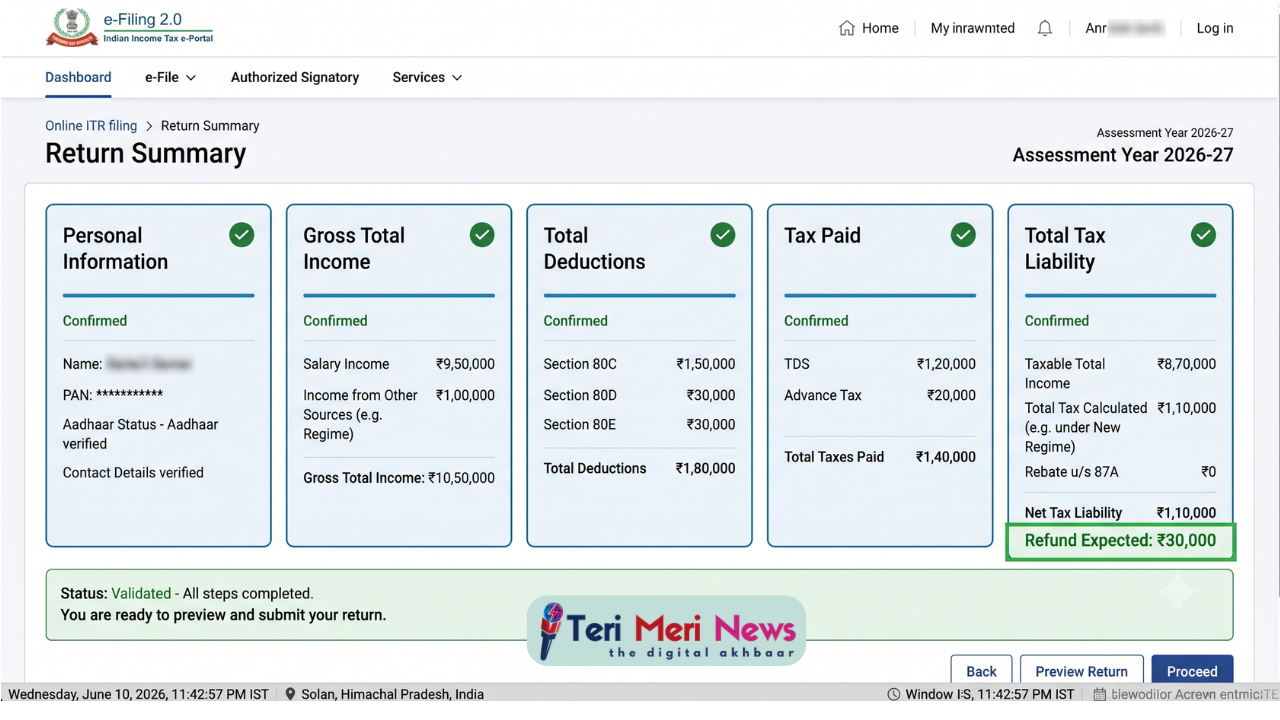
Click on the final tile, Total Tax Liability. The engine will execute the tax calculation algorithms based on your selected regime, computing marginal relief, surcharges, and the 4% Health and Education Cess.
- If the result shows a Tax Refund, you are ready to proceed.
- If the result shows Tax Amount Payable, you must click on Pay Now. You will be redirected to the e-Pay Tax portal. You can settle the due amount instantly using Net Banking, UPI, RTGS/NEFT, or Debit Card. After payment, a Challan Receipt (BSR Code, Challan Number) is generated. Ensure these challan details are populated in your ITR under the ‘Tax Paid’ schedule before moving forward.
Step 8: Preview and Final Submission
Click Preview Return. Check the declaration box, enter your location, and review the compiled PDF document of your entire return. Look for any glaring anomalies in the gross figures.
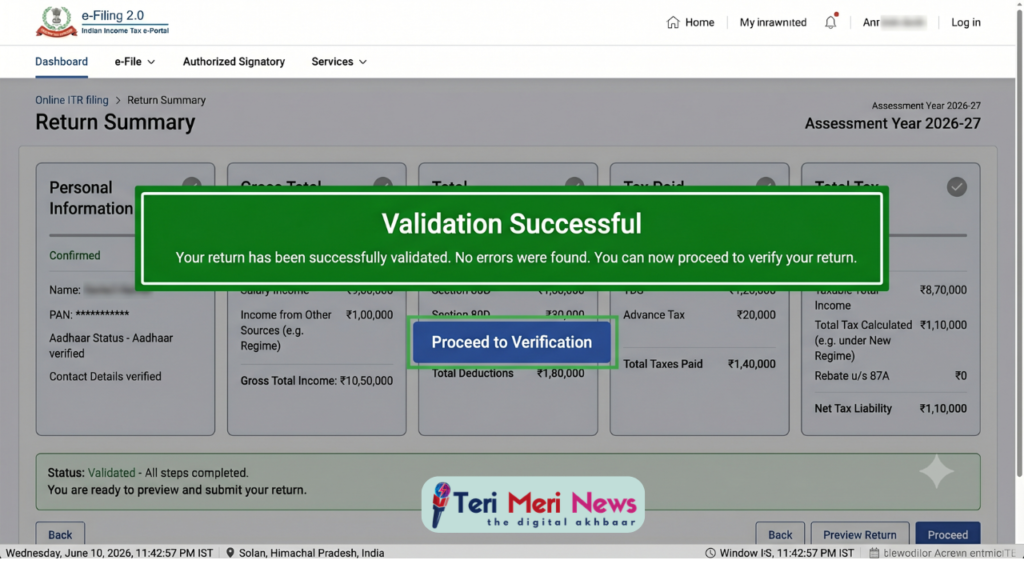
Click Proceed to Validation. The system will run a structural validation check to ensure no mandatory fields are blank.
Once validated successfully, click Proceed to Verification.
The Crucial Final Step: e-Verification
Submitting your ITR is only half the battle. As per current regulations, an unverified ITR is treated as an invalid return (as if you never filed it). You must e-Verify within 30 days of submission.
Options for e-Verification:
- Aadhaar OTP (Recommended & Fastest): An OTP is sent to the mobile number linked to your Aadhaar. Enter the 6-digit code to instantly verify.
- Net Banking / Demat Account: Route through your bank’s portal to verify securely.
- Electronic Verification Code (EVC): Generated via an ATM if you have linked your PAN with your debit card.
- Physical ITR-V: If digital verification fails, download the ITR-V, sign it in blue ink, and send it via Speed Post to the CPC, Bengaluru within 30 days.
4 Common Technical Mistakes to Avoid
- Ignoring the TIS/AIS: Many taxpayers assume Form 16 is enough. The Income Tax Department utilizes Artificial Intelligence to scan the TIS. Omitting small dividend incomes or minor capital gains will almost certainly trigger a compliance notice under Section 139(9) or 143(1).
- Forgetting to Report Exempt Income: Items like PPF interest, EPF interest, and agricultural income (up to ₹5,000) are tax-free but must be declared under the ‘Exempt Income’ schedule.
- Job Switching Errors: If you changed employers during FY 2025-26, you will have multiple Form 16s. You must consolidate the salary data and ensure deductions (like the basic exemption limit) are not claimed twice, which often leads to a massive shortfall in tax paid.
- Blindly Accepting Pre-filled Data: Pre-filled data is a facilitation tool, not the final word. Banks sometimes make errors in TDS reporting. Always cross-verify with your own ledger.
Conclusion
Filing your ITR online in India for 2026 has been engineered for transparency and user autonomy. By organizing your documents, analyzing your AIS, correctly selecting between the new and old tax regimes, and following the meticulous steps laid out above, you can ensure a flawless filing experience. Remember, early filing not only secures faster refunds but also shields you from last-minute server bottlenecks.
Frequently Asked Questions (FAQs)
Q: Can I change my tax regime after filing the ITR?
A: You can switch regimes only before filing the original return. If you file under the New Regime and later realize the Old Regime was better, you can file a Revised Return (under Section 139(5)) to change it, provided it is done before the December 31 deadline. However, individuals with business income (ITR-3/4) have stricter rules and cannot switch back and forth annually.
Q: What happens if I make a mistake in my filed ITR?
A: The portal allows you to rectify errors by filing a “Revised Return.” You can revise your return multiple times before the end of the Assessment Year (December 31, 2026) or before the completion of the assessment, whichever is earlier.
Q: Is it mandatory to file ITR if my income is below the taxable limit?
A: It is not legally mandatory if your gross total income is below the basic exemption limit (₹4 Lakhs in the New Regime, ₹2.5 Lakhs in the Old Regime). However, filing a ‘Nil Return’ is highly recommended as the ITR serves as an authoritative proof of income required for loan processing, visa applications, and claiming TDS refunds.
Disclaimer
Some of the Image illustrations are AI-generated for better understanding.
How to Sell Digital Products on Etsy from India